Fighting LinkedIn AI Hype With Ironic AI Hype 2026-01-16
Hanging out on LinkedIn in 2026
I posted about yesterday's post on LinkedIn, because it seemed like a low-key way to get people to consider my CV. Although I'm not exactly job-seeking at the moment, we ARE having a big surprise technology function re-org, and it feels like a great moment to be prepared for a role change. So, if you're reading this and you think - hey that guy sounds like someone I'd like to work with and you're hiring people for something fun, now might be the perfect time to reach out 🙏
Anyway, LinkedIn appears to be having a bit of a cultural resurgance of late, which is interesting. People are using it a lot more like a general purpose social network than ever they used to. I have a few thoughts about why but they can wait for a different blog post. I kind of like it, because I'm always sincerely happy when people make "content" 🤮 rather than just passively consume stuff. A lot of the content is a bit awkward, because there's obviously a motive toward self-promotion, as so much of the LinkedIn audience are job seekers, recruiters and sales people, but still my feed quite often has interesting content popping up. It's kind of 'business instagram'. Instagram but all the influencers are dads, dad-dancing at the school reunion disco. It's honestly not without charm. Not all posts are equally enjoyable though.
The robot Elephant in the room.
AI Hypers! Of course LinkedIn loves AI hype! Now, I'm quite fascinated/entangled/repelled/enchanted with the AI boom myself. We're certainly having an industry moment, and like each crazy boom cycle I've seen in this domain, it's a bundle of awful things mixed in with amazing things, and fun things and tragic things all at the same time. One thing is certain though, there's a lot of AI opinions surfacing on LinkedIn right now. Too much I think. They're a bit repetetive, and I'm not always seeing that much valuable content from them.
Typical AI boost content
Jane Q. Businessguy posts something like this. (Not their real name. I made them up. I made the content up. This is satire. I am British, cynical sarcasm is what we do)
🚀 HIRING TIP 2026: QA IS DEAD 🚀
Yesterday I blew my own mind. I was thinking out loud in the bathroom, and minutes later, after a couple of deep inhales, I had implemented one basic Selenium script from a prompt transcribed from a voice note that runs our smoke tests automatically and honestly? We don't need QA teams anymore!!! Think about it: automation = no bugs. It's that simple. The future of software is here and frankly, any company still paying QA professionals is throwing money away. We're living in 2026 but some of you are still hiring like it's 2015. This is the kind of paradigm shift that separates the industry leaders from the dinosaurs. We've moved past the era of "manual testing." Those days are OVER. If your organization hasn't eliminated your entire QA department by Q2, you're already behind. The math is simple:
Automation = efficiency Efficiency = no QA needed QA people = legacy cost
Welcome to the future. You're welcome. Don't @ me if you're not ready to hear hard truths.
#Innovation #Disruption #FutureOfWork #Automation #TechLeadership #HotTake
🤔
I'm pleased for Jane, although I'm quite suspicious that something like this ever actually happened.
Wait! It didn't, I made it up! I made Jane up too!
Phew. But what if some of the LinkedIn posts I'm seeing are also... made up. Some of them might even be made up by AI. Could I do something about this?
I could really do with some kind of content filter. It's a shame LinkedIn doesn't allow me to train my own algorithm. Maybe something else could do this though. Maybe this is one of those mythical use cases that are great for AI?
Fight Fire with Fire!
LLMs are really well suited to content classification. I guess if I could find a way to put the LinkedIn content through an LLM and prompt it to identify boring unispired AI cheerleading, I could then reduce the frequency of it. Or maybe just filter it out. I guess I need a semantic ad-blocker. I wonder how hard that could be to build.
Time to talk with Claude. I fire up claude desktop.
How could I build a plugin that filters LinkedIn Posts ? I'd like to use an LLM to build something that removes low quality posts boosting AI or LLM from my feed, ironically
Claude grinds away on this for a few seconds, and pulls out a couple of options. The architecture suggestion is a browser extension. Makes sense. I've built browser extensions before, they're kind of annoying, but the best way to get code control over live browser content. OK Claude, I'm listening..
I scroll past the typescript skeleton code it's printed, unasked for. Another thing I don't want to do is let random LinkedIn content posters burn tokens and the planet for me on some kind of expensive remote AI API. But my (fairly old) desktop machine has a moderately OK recent-ish radeon (AMD Radeon RX 7600 XT iirc). I've used this quite a bit for playing with local models using transformers or llama.cpp or ollama I should be able to do sentiment analysis and tagging on this in something close to real time I reckon.
Ok, I hit the bottom of the claude window and follow up with this
let's do this - generate me a prompt for claude code. An extension - I'd like the UI to just dim post content on a linkedin home page if it strongly matches the criteria - lets use ollama and a small local model like gemma3:12b-it-qat
here's what claude gives me. Let's just pass that into Claude code, see where it goes...
To the Claudemobile!
Ok, so I make a bare directory for the project, called 'linkedin-silencer', chdir to it and run claude , which launches vanilla claude code, updated today, no plugins or user config. Let's raw-dog this. I plop the claude generated prompt into the terminal, and sit there for five or six minutes agreeing to everything. When it's done I ask it to git init and commit what it has and then I quit claude code. Let's have a look at what it's generated for me in an editor.
To the Zedmobile!
I have an ongoing love/hate affair with the amazing zed editor. Much more on the love side than the hate side. What I particularly like about it is a couple of things
- it has fantastic out of the box support for common tooling infra. Something like a browser plugin, I'll have the language servers, the linters, whatever all just immediately there and working.
- it's not vscode
- it's really responsive, the performance of the editor and the editing widgets is super-fast. (i guess i'm just repeating 'its not vscode')
- i like how their UX for llm-assisted coding makes it super easy to feed whatever model you like (local, remote, different sizes), with context pulled in directly from the project files - e.g. , you can easily pop a dialog window and have a conversation that asks about just one function in the current file, with reference to a test suite in another file - using completable shortcuts, and it assembles the prompt context for you.
zed really deserves it's own blog post at some time, but once again this is not that blog post.
zed fires up on my project, and I immediately see a bunch of red diagnostics. Oh no, my code is full of bugs I guess. It's not even my code! 😭
I told you LLMs make buggy code!
Yup, this is still sadly true. This is one of the things I think upsets a lot of people who don't like to engage with them. The magic genie still doesn't perfectly perform the magic trick. I guess it would be cool if you could just say 'hey genie, make a thing that's awesome' and trust that it would just happen, but we're not quite there yet.
To be fair to the robot, I don't write code without bugs myself. Also, it takes me much much longer to write my bugs. And, because I'm a selfish egotistical human programmer, I tend to not believe that I've made any bugs and it's sometimes a bit difficult to get my head into the right mode to debug them, because I can't immediately conceive of how or where they would exist. However, I totally get that from a certain point of view, this is breaking the enjoyment model of programming. Lots of people like writing code. Lots of people hate debugging code. Me too, to a certain extent. So now I have to debug maintainence code written for me by a dumb robot. This seems like a bad trade.
That's not the only way to look at this though. One of my big problems is sustaining the motivation to carry through with ideas some of the time. (I have that kind of brain). Ideas are pretty cheap, but iterating on them and executing them can be quite costly. And I already wrote a bunch about the idea of higher order tools as a way to reduce programming adjacent work . This is key to the appeal boundaries I find with the current generation of assistants. The most useful stuff they offer is a way for me to delegate the really boring bits of work like 'setting up a tsc project' , or 'building a nice looking README.md' , or 'refactor that submodule name'. And they can deliver on some of this, some of it really well. Right now though, we have bugs. Well, at least zed will let me use some more assistants for debugging. Let's see how far this river goes.
Debugging
Zed gives me the typescript diagnostics on a separate pane. It's not too bad. there's about two dozen errors, most of them type assignment things.
One thing pops out, it's not happy that I'm using 'chrome' apis for things like local storage. Browser extensions are a bit odd. They basically work like a little web service running in your browser. There's roughly 3 bits to it - the content script (the UI stuff for the extension, works a lot like a traditional JS document), the background service (a service worker, a javascript that runs in the background inside your browser session), and the local store (a way to get data persistence for your plugin, it's basically a KV store kind of thing wrapped over SQlite) - I assume the apis for these are something i need to add to my typescript compiler configuration - they're not part of normal JS I guess.
I pop open a zed assistant window, set it to 'ask only' and 'claude sonnet 4.5' and type
@service-worker.ts - why are there so many diagnostic errors about missing 'chrome' - I'm trying to write a browser extension. I suspect I'm missing some node module or type definitions?
The assistant pulls in the diagnostics tab output and says
The issue is that TypeScript doesn't know about the
chromeglobal API. For browser extensions, you need to install the Chrome extension type definitions. Let me check your project setup:
and tells me I can fix it with
npm install --save-dev @types/chrome
this sounds at least 99% right to me, so I do it. Yup, fixed. I commit this change to git.
The next, and only, non-type error is a bit odd 'duplicate function' against a function called classifyPost , which is a function in the service worker that takes in post text and returns the classification - either 'KEEP' or 'FILTER'. I can see that there's also a function with the same name i the content script. I guess that all the functions in the project are getting combined into the single top level namespace. There's no implied scope then. I guess I could fix this by changing one of the function names, probably using 'rename symbol' in the language server. But maybe there's a way to namespace things ?
I bring the assitant back and ask it
there's a name collision because in @service-worker.ts there's a @classifyPost() but there's also a @classifyPost() in the client/side content code. why is this an error , should these be using some kind of namespace mechanism ?
Claude says yeah, these files are getting pulled in as scripts not modules and everything is in the global scope. It suggests that if I simply add empty 'export ' statements to each they'll be loaded as modules. All I can really remember at this moment about ECMAScript modules is that they're a bit weird, relatively recent, and there's a few different ways to provide library scopes, and some back-compatibility quirks. This suggestion sounds about 75% right to me (hell, I'm no JavaScript expert), but the change is so small I figure it's worth it. It works, so much as the errors go away. Ok, makes sense, i don't need to share any symbols. Let's commit this.
The next small tranche of errors are all about assingments, and I can see they're all coming from storage fetches. It looks like claude has implemented a local LRU cache or something, using the aforementioned local store APIs, and it's pulling values out of this in helper functions and not bothering to consider that the key lookups might return nulls. Classic type fun with database nulls! Well, I know enough to fix this, so I just manually add some intermeidate x | undefined types to the fetches, and put if guards around the reads and return paths. Close enough for jazz
The final error flummoxes me a bit. There's a loop around the elements fetched from the page Document , and it's complaining that the ChildElementList type isn't presenting as an iterable. Sounds legit, but also the code looks fine to me. Assitant time again.
can you tell me what's wrong about this loop - it thinks the NodeList isn't iterable @linkedin-filter.ts
The assistant explains that my typescript configuration isn't including the necessary types to make NodeLists fully iterable. I hit a traditional search engine for confimation, and then I add "DOM.Iterable" to the lib: array in compilerOptions . Zero errors.
I pop open zed's integrated terminal and type npm run build. It builds!
The problem with browser extensions is you have to install them
I'm feeling a bit cocky so I decide to try the extension in firefox. I load it manually using the dev tools as a local unpacked extension. Firefox refuses, because it says the service worker can't be found in background.scripts . I've seen this bug before though, manifest v3 support is a bit variable between browesers.
I add background.scripts = ["service-worker.js"] to the manifest and rebuild and install.
It loads!!! What have I done?! Look on my works, ye mighty, and despair.
I quickly load my Linkedn Page. It's full of AI hypers though 😢 The extension doesn't work.
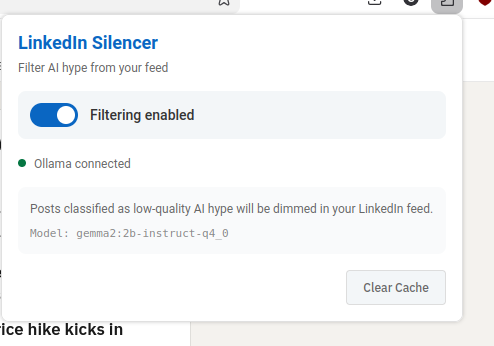
I pull up the extension UI from the toolbar, and it's enabled. But there is a little red error message saying 'ollama not connected'. Oh dear. I check ollama and the server is running. More debug time.
I figure this one out manually using the web dev tools on the service worker inspector, and playing in console. The requests that are being made to ollama are getting 403. Huh. I wasn't expecting that, it's some kind of auth problem. Ugh, I bet it's CORS stuff. That's always tricky with extensions, they're typically requesting from a weird origin.
I know this, it's a UNIX system!
A bit of searching and a quick chat with claude desktop, and yup, ollama is strict about request origins by default in server mode. I can't blame it. After a bit of fiddling with ollama config, and lots of cursing at systemd overrides. I figure out how to configure Ollama to trust a specific origin (firefox has generated an origin url for the extension automatically, like moz-extension://foadfadfoasdfasldjfadslfja) I can trust this origin really, because its an extension I've installed myself (although I'm not leaving it on like this until I've properly read all the code, i've been running it in the debugger and i can see the requests are pretty straightforward).
I spend about 35 minutes messing about with systemd and restarting ollama before i get the recipe right (this is actually the longest bit of debugging) , and then all of a sudden, I notice the requests have switched to 200 and I reload linkedin and ... almost every post is dimmed and tagged as AI hype. Hmm. It's sorta working. Looking at the posts though, a lot of them are just a bit hype, rather than AI hype. So I adjust the prompt I'm sending, and everything seems good. I now have a browser extension that tags and dims annoying AI hypefluencer posts.
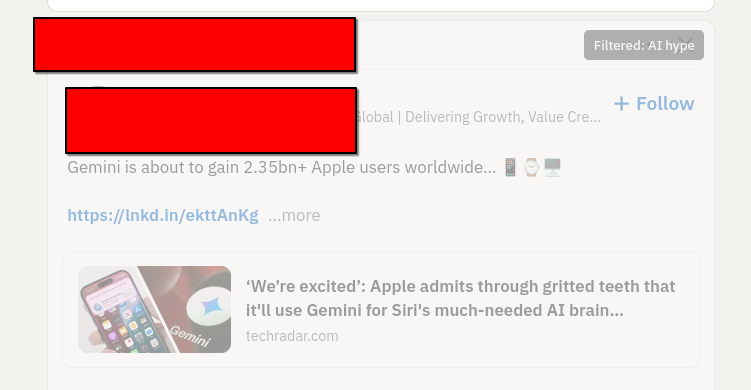
I've pushed the whole thing to GitHub, if you're interested enough to peruse. I'm sure it still has plenty of errors, but it works well enough for a blog post, and maybe well enough that I'll refine it into something a bit more useful. I haven't even tested it in chrome browsers.
Now the only thing left to do is to write an hyped up linked in post about my little project, and see if it works on my own content!
Learnings
- browser extensions can be pretty cool content filters
- LinkedIn is great, but it sometimes can get a bit vapid.
- Anyone who's still telling you code generation assistants are just autocompleters that don't actually work is probably uninformed
- free local LLMs can do short text classification work very quickly with modest hardware
- I like claude, but I get most value from using it from a mix of clients
- Zed is pretty neat, if you're at all zed curious, I say .. do it.