jobcentre plus 2017-09-30
So, I seem to be unemployed again. Voluntarily, of course. Excited, and seeking new opportunities!
tagged as
So, I seem to be unemployed again. Voluntarily, of course. Excited, and seeking new opportunities!
Now I can post short updates from the most basic client possible, which is pretty low friction. I should be able to extend this all the way to full articles eventually
Further work at hooking into micro.blog. If I extend my slightly moribund 'linkblog' special case formatting to a new 'short post' class, and then generalize this to cover indieweb 'notes' style posting, then I should be able to build a dedicated feed for notes that fits in better with micro.blog. These short updates will just appear inline on the blog site as de-emphasised text, without article formatting.
I finally wired up micro.blogs! I have a micro blog. I'm not really sure what it is for but it's there. I like it anyway, because it's called cms. In order to get it working, I had to make RSS work slightly better than 'barely', and so now I have an RSS 2.0 feed. The 00's are back! It's all about microformats and POSSE and syndication and decentralization, and taking back the web.
I appreciate it's an outside chance, but should you have a micro.blog account you can follow me on there, and reply back, and be friends, and stuff. Should you not have a micro.blog account, but think you might like one, HMU, I probably have some invites or something The indie web can never die!
Can birds fly into a headwind faster than their own maximum speed ?: An intriguing suggestion. I've long admired the eider duck's specialized adaption to a brutal climate.
The Bitch, the Stud and the Prawn: " It was a film called Crust. It told the story of a pub landlord who finds a giant seven foot mutant shrimp on a beach. The landlord then decides to teach the shrimp to box - and believes this will make his fortune. "
Creating retain cycles by misusing assertions : The documentation does state it, but it's always worth remembering that NSAssert is only for use inside Objective-C methods.
I love making New Year's resolutions. I'm not sure I am good at them, but I enjoy the tradition. Every year, I tend to set at least a small handful. Sometimes they're entirely private, sometimes I publicise them. I don't know that they ever tend to be that successfully realised, but to me that's part of the system. I like to think there's much that is useful to learn from how I fail to achieve them, and maybe that's some part of the benefit. Sometimes I pull them off with aplomb, and that always feels pretty good.
This year I set myself an extraordiary reading challenge. A couple of years ago, on some kind of whim, I think prompted by a positive review in either The Guardian, or Word Magazine (RIP), I purchased, and read Lives of the Novelists by John Sutherland. This is an engaging biographical chronology of the English novel. It covers 294 novelists of significance in historical sequence. The format is readable, there's a 3-4 page potted biography of each author, and then a short summary. So you end up with a sort of illuminated canon starting in the seventeeth century, and leading you up to the roughly present day. The author choices are not always obvious, but neither are they deliberately obscure, and the tone is light, cheeky and erudite, and it works as an entertainment just as much as a reference piece, I unreservedly recommend it.
Part of the summary notes at the end of each chapter, suggests a Must Read Tome, for each writer. These themselves are not always the most obvious work, and carry a little paragraph of justification alongside the choice. So for 2017, in a fit of optimism, alongside a grab-bag of other self-improvement goals, I decreed I would attempt to read every MRT in sequence. Clearly this was an overreach going in. 294 books is approaching a novel a day, and I was unlikely to chew through all of them in the year, but I figured I could keep going with it and see how well I did.
We've passed the halfway mark now, and I'm happy to report it's going awfully. I have managed four books. The most recent one is not even half-finshed. I guess I kind of suck at this. I think there are a couple of mistakes I made on the surface. One I have already skirted around - it's too big a target. Factor into that the fact that I have relatively little spare time for reading fiction, and I also decided to take on a pile of other resolutions that demand daily hobby time (I'm teaching myself a foreign language! Badly!) and it's even more daunting a target. One book a month would be quite a feat, if I'm honest.
I think I might organised little potted reviews as I finish each book, to try and gee myself along a bit. Also, I made a resolution to do more blogging in 2017. That's right, does it show? Book reports seem like easy-reach fruit. Watch this space.
Perhaps the most egregious error though, was to fix myself to the chronology. Whilst this means that I am starting out firmly in the lands of the copyright expired public domain, which makes legal book aquistion very economical, it also means that I've front-loaded the material with tough going books. We start out with challenging archaic language, and structure, and this makes an already sluggish project a little more slower going. I don't believe in changing the rules midstream, however, and I intend to persist.
I thought I'd broken the back of the slightly-too-hard-to-read-comfortably years, when I got through to Defoe, but I hadn't taken into account another pitfall of the early romantic novel. Verbiage. After Defoe I get Samuel Richardson. And the MRT is Clarissa. That's nine fricking volumes of epistolary marriage plot. It might be the longest novel published in the English language. I've nearly finished book one, and it's taken me three months. I sincerely doubt I'll get through this bugger before 2018. It's fascinating, heady stuff though, I am enjoying it. Many tribulations, and archaic mores. A terrifying insight into the political lot of even the priviliged eighteenth century englishwomen. Also, much swoon.
Could this be a ten year project? I'm not quitting.
My friend Jim won 15 quid by solving the New Scientist Enigma Puzzle. The really neat thing is he did it 32 years after the fact. Read all about it here , in his own words.
Would anybody with a working BBC like to contribute a real world run time for his BBC BASIC based solution?
Jim runs the Enigmatic Code blog about his hobby of solving New Scientist's Enigma puzzles using short python programs, which anyone can play along with at home.
L'Inconnue de la Seine : The death mask of this unidentified Parisian teenage suicide became a popular early-20th century objet d'art , eventually the model for the face of the standard CPR training mannequin.
Cauliflower Hindenburg : taken from a series of model reconstructions of famous explosions, made from cauliflower.
'Supergiant' crustacean found in deepest ocean : 34cm amphipod discovered in the Kermadec Trench.
I was churlishly unimpressed by the iTunes "12 days" Christmas promotion this year. However whilst subsequently browsing the iTunes Store home page I did find one app that impressed me enough to blog about.
There's a store section called " Apps Starter Kit " which lists a dozen or so applications that Apple are promoting as "must have" installs for new iOS users. I installed a handful of these to my iPhone 3GS, but the one that has most impressed me so far is the iOS edition of DragonDictate .
It's a "split brain" app, by which I mean it uses "the cloud" to perform the text-to-speech conversion. So far I have been quite impressed with the accuracy of the process, in fact I have created this blog post by dictating while walking the dog, with just a little editing afterwards for tidy up and to add hyperlinks. I suppose it is a little like a poor man's edition of Siri, minus the pretend A.I. and the search and reminders integration.
You can get text by dictating into a text box within the application and there is a quick menu of options that allow you to create an SMS or an e-mail or copy the text to the system clipboard easily for use in other applications. This collaboration isn't too clunky and although dictating text into your phone is a little stilted it doesn't seem to be significantly less effective than my relatively crappy typing on the iPhone on-screen keyboard.
The app was free, presumably it's intended as a promotional device to introduce users to the Dragon family of software applications. Obviously there are some privacy concerns raised by having the voice processing performed on a remote server, but the terms and conditions include a privacy policy which guarantees to preserve your anonymity and keep your data private. The application did even prompted me to ask if I wanted all of my contact names uploaded to the remote service for greater the use of name recognition, and took pains to explain that this would only include name fields from my contacts database and no other personally identifying information or contact details.
I am not sure I would make a habit of using it for writing long articles or even blog posts like this but I think it could prove to be quite useful for such purposes as short e-mail replies or even sending SMS messages in situations where it's inconvenient to type.
Faster Fourier Transform : MIT researchers will present a new algorithm that improves on FFT.
I knew Christopher Hitchens better than you : Neal Pollack clearly knew him very well indeed.
According to wikipedia, the term " Churnalism " was first coined by a BBC journalist. I think they may still have journalists working there.
See how many items of product placement you can see in this proud piece of presumably PR-led "pop sci" about smart vending machines . I found it, prominently linked, on the BBC news home page on Boxing Day. The entire notion has a whiff that classic of white elephant puffery from the old school the internet fridge about it.
I don't know if I'm alone in finding this sort of thing repellant. The motivation to whip up this kind of nearly content-free guff into page length pieces must come from somewhere, which means a degree of specific intent. There's the skeleton of an interesting piece on mechanical learning and commercial interests buried in there somewhere, but I find it difficult to read when I keep being stabbed in the eyes by blatant marketing copy, much of which I uncharitably suspect of being pasted in directly from the source press-release. The focus of the piece ought to be on the science, perhaps some of the biometrics and algorithms supporting the interesting sounding audience impression metric (AIM) software , but that's given a throwaway mention; instead the article's centre of gravity seems distorted to orbit around some recently launched consumer products, with little depth of story. Weird details leave unanswered questions hanging. In what way is a new Jell-O SKU "Just for adults" to the extent that it requires a screening interview by femputer ? Titillating teaser questions like this are familiar marketing devices used to capture and exploit base curiosity, but seem out of place in a news piece without any resolution. How does the system handle adults whose body shape diverges strongly from their defined four age brackets? What the merry heck is a general manager of personal solutions anyway?
I gave up counting the product placement incidents after the first couple of paragraphs. Only someone with intimate knowledge of the BBC house style rules would know just how many direct repetitions of the properly capitalized brand names Kraft and Intel are strictly necessary, but there seem to be an awful lot of them littering the piece. There's a lovely Intel i7 box graphic three-quarters of the way down the piece; it seems to me only tangentally related to the story, yet conveniently re-uses the branding iconography supporting their current consumer-targetted CPU line.
Like many a British license-fee payer, I have a peculiar, combative slightly proprietorial relationship with the BBC; being in some weird sense a stake-holder in this unique broadcasting organisation; pride mingles with a misplace sense of ownership, disappointment tangles with admiration. Once upon a time I viewed their web initiatives as exemplary, inspirational and essential. These days they seem increasingly overcooked, irrelevant, and misguided.
I realise, in a sense, I'm a grumpy old man ranting at the telly, but I think this tapering off of content quality provided by BBC online is a real thing. If so, a really worrying trend; added to this we have an effectively Conservative administration, who I'm sure would love to see the BBC, already in retreat, broken up further. Spreading out the more lucrative parts of the special quasi-monopoly, to their chums in commercial broadcasting whilst binning even more of the less lucrative parts in the name of austerity would fit in well with their principles of government.<p>This is a merry dance.
One of those things I generally expect to be part of the routine of running a linux desktop is a certain amount of manual effort necessary to keep things running smoothly. Sometimes this is the classic multi-decade horror story of "sound card" configuration. Sometimes its the inevitable friction between under-specified hardware and volunteer-maintained drivers. Sometimes it's the CADT principle, where everything changes around you, just because it can, as part of the generational cycle of collaborative software development. Sometimes it's just the self-induced consequence of having a system where you can tweak and configure everything to work however you'd like it to, and therefore you choose to, and sometimes that's quite a deep rabbit hole. This tale covers a small handful of these categories, although it's primarily a consequence of that lattermost case.
Mod keys. Modifier keys, that is. Those would be the keys you hold down alongside other keys to change their behaviour. The most obvious and venerable of these is SHIFT. Hold that down and type an alpha-numeric key, and you generate a different character. With the alphabetical keys, you GET THE CAPITAL LETTER FORM. Other keys, like the numerals, get you punctuation. You may also be aware of the Alt/AltGr modifier keys, which hang around on most keyboards, and generally allow access to a different shift level, further symbols and accented characters. And then there's control, or CTRL. Maybe you know that guy as the menu-shortcut accelerator key, or maybe for a couple of shortcuts you might use in the shell, if you're a shell user. Actually the kids all call it 'terminal' these days, because that's what Apple does. And then they all use iTerm anyway, for I don't know why really but I'm sure it's great. Anyway, calm down Mac-loving readers, this story is about how terrible linux is, you're all wonderful. So CTRL in the shell - CTRL + C cancels things, CTRL + D ends a session. CTRL + A takes you to the start of the line. CTRL + E takes you back to the end. Assuming you're using a fairly standard bash shell. Those last two are slightly more interesting, and immensely relevant to this story.
They're readline bindings. Readline is a GNU library used to make command line shell editing a little more interactive. And because bash is the GNU shell, it uses readline by default. Those keybindings are the default readline bindings, and they work the same in any application that uses readline. Typically this means other interactive shells. These keybindings are taken from Emacs. Emacs is a text editor, that is to say it's an application for interactively working on so-called 'plain text' files. Not that's there's any such thing as a plain text file. Emacs is one of the most ancient, convoluted, complex, crufty, awkward pieces of software you're ever likely to encounter. It's one of the original fundamental components of the GNU system. You might say it was the standard editor. Emacs is also one of my all-time favourite things. So those readline keybindings we were discussing, are intended to bring some of the more capable text editing commands from the GNU text editor across to the GNU shell, making use of modifier keys. Emacs really really likes modifier keys.
Because Emacs is a very old piece of software, it's design was heavily influenced by the keyboards typically used on the systems of its time. Computer use was a lot more text and command oriented, and the large, pre-PC era keyboards tended to reflect this by having a large amount of mod keys and function keys available. Commonly cited examples are the MIT or symbolics lisp machine 'space cadet' keyboards, and the Knight keyboard. As a consequence of this emacs can understand a lot of different modifier keys, and has a UI that is organised around layering functionality onto different keyboard 'chord' operations. You really need at least two distinct mod keys as a bare minimum to get emacs to do anything useful at all. We already met CTRL a couple of paragraphs back, but you also need another key called META. Emacs uses them in fundamental, and interestingly composable ways. For example, you can move the cursor forward one position by typing CTRL + F, but you can move the cursor one word forward by typing META + F. It's powerful, and sort of intuitive once you understand the fundamentals quite well. Unfortunately, they mostly stopped making keyboards with META keys on them some while back.
Now I am getting quite old, but I'm not ancient enough to have run emacs on pre-Internet era hardware. I did use it a little bit on 7-bit serial terminals, and limped along using ESC as a prefix modifier, like a farmer, but by the time I started really learning how to use emacs to any serious degree, I'd made the jump to UNIX machines using X11 as a graphical user terminal. Some of the UNIX workstations had a META key. Some of them didn't, but had a few other modifier keys. Increasingly, UNIX graphical workstation started to mean 'Linux and XFree86 on PC hardware'. Now IBM-derived PC keyboards don't have a META key and never did. The original PC keyboards didn't really offer many modifier keys, but by this time period, everything had mostly standardised on the 101/102 key IBM extended model archetype. This doesn't have META keys, but it does have a pair of prominent ALT modifier keys. And so, we begin to remap.
X11 is maybe one of the canonical reference points for design by committee. Fully intended to offer a portable graphical , networked user interface across a variety of dissimilar UNIX systems, it tries very hard to offer the broadest possible set of abstractions across similar base behaviours, trying to build a unifying API in all aspects. Screen dimensions and orientation, color model and layout, pointers, input devices, key-types, you name it. So you can usually configure your equipment in a bewildering, verging on frustratingly flexible manner. X11 is a very broad church and welcomes all kinds of keyboards. X11 allows you a whole byte for modifier keys (I think), so you can have Shift, Lock , Control, and then five others called Mod1 through Mod5. You can freely map key codes onto key symbols, and then assign key symbols to one or more modifiers. So obviously this all took fourteen hours to decipher in the first instance, but I gradually became reasonably adept at using the Xmodmap utility to set ALT to be both ALT and META, CAPSLK to be another CTRL and life was mostly good. You'd tweak your .Xmodmaprc file every time your keyboard changed significantly, load it in as part of your login, and everything would work. PC-104/105 keyboards came along, with windows keys, and this meant that you could perhaps add a SUPER or even a HYPER key, and bind those to other emacs macros. The system was working, and everyone got rich on the proceeds! Or not. Nonetheless, although linux desktop software was fairly terrible, it was a fine environment for running Emacs, and running Emacs was where most of the work got done after all.
Times have changed however, and systems have changed, and uses have changed, and so have I. Like everyone else, I started using laptops more. Modifier keys started getting scarce again, as the machines shrank down to be portable, and interfaces just grew ever more graphical. For about a decade, I used Macintosh systems, which represent their own series of keyboard configuration challenges. Macs are actually pretty good for modifiers, if I'm being fair - they have their own dedicated command key for all the system key shortcuts, and so you're free to map control and option as you see fit to control and meta. They even give you a little GUI configurator for managing and assigning modifier keys, which is way more convenient than spending hours searching for information about xmodmap. The main suckitude is that they don't have a symmetrical set of them on their laptop keyboards. You don't get a right hand CTRL. Symmetry is important for healthy typing habits with key chords, because it's vastly better for your hands if you use both of them for combinations. So you ideally want to be able to hold down CTRL META SUPER or some combination of them with one hand whilst you type the activation keys. So CTRL + C is best expressed as a right hand finger holding CTRL, whilst your left middle finger taps the C. So my life as a Macintosh Emacs user was constantly blighted by crazy-ass schemes to find keyboard layouts that allowed unstressful ways to type CTRL key combinations.
For the last few years though, I've been back on the linux horse (and why is a different story, for another day), and my main laptop, a battered lenovo ThinkPad, has a full set of three modifiers either side of the space bar, where they were intended to go. The Debian GNOME 3 desktop is configured to use the windows and menu keys for desktop commands, and the ALTGR key, which I have on the right, as some kind of compose prefix. Even thought it's X.org now, not XFree86, and Xmodmap is heavily deprecated in favour of the XKeyboard and Xinput extensions, using the GNOME configurator and then some of my old Xmodmap ways, I could make this go away, and map ALTGR to a right meta, ALT to a left meta and the windows and menu key to SUPER and HYPER. The lenovo x220 I use has a particularly excellent keyboard and all was right in the world.
And then GNOME 3.22 switched to Wayland as a display server, rather than X. And this year's Debian defaulted to this. Even though there is an X11 compatibility layer, GTK+ and GNOME on Wayland do not talk to X11 directly for mediated key events any more, and this meant that Xmodmap can't be used to universally set modifier maps. GNOME 3 on wayland will still use xkb for key configurations, and this meant another fourteen hours of fiddling about in order to come up with a keyboard scheme that works for both GNOME and legacy X using the XKeyboard extension (XKB). This was not made any easier by the fact that all the attempts to search for information on this get bogged down in legacy explanations about Xmodmap or how to enable XKB for X11. But I got there in the end
It seems like there's not actually any supported, or easily documented way to load user configurations into GNOME 3 + Wayland's XKB environment, so I ended up slightly disappointedly hacking them into the system options files. Of course this meant that several months after I did this, a system upgrade overwrote all of my changes, and I was left without a keyboard, and a scant recollection of how I ever did it, or what any of the bits were even called.
So this morning I figured out how to assemble it all again from first principles. To make it more worth my while, this time I decided to transpose all of the mod keys as I went, so I can have CTRL on the inside of META as it was originally intended to be, and push the other modifiers to the outside edge. To save myself the bother the next time this breaks underneath me, I thought I'd write down the exact sequences here. I am not going to try and attempt to explain XKB here. There are a several documents on the web that do that job, to varying degrees of success. I'm not going to pretend that I understand how it all works, I just experimented with xsetkbmap and xkbcomp under an X11 desktop until I understood how to express what I needed to work under Wayland. Here are the steps.
System-wide keyboard configuration is fine for configuring the basic keyboard layout - using the Debian keyboard configurator, I can pick either a ThinkPad or a pc-105 model with a gb layout. The modifier layout can then be selected using xkboptions. I can tell GNOME what XKB options to apply from its database, using the dconf configuration key /org/gnome/desktop/input-sources/xkb-options.
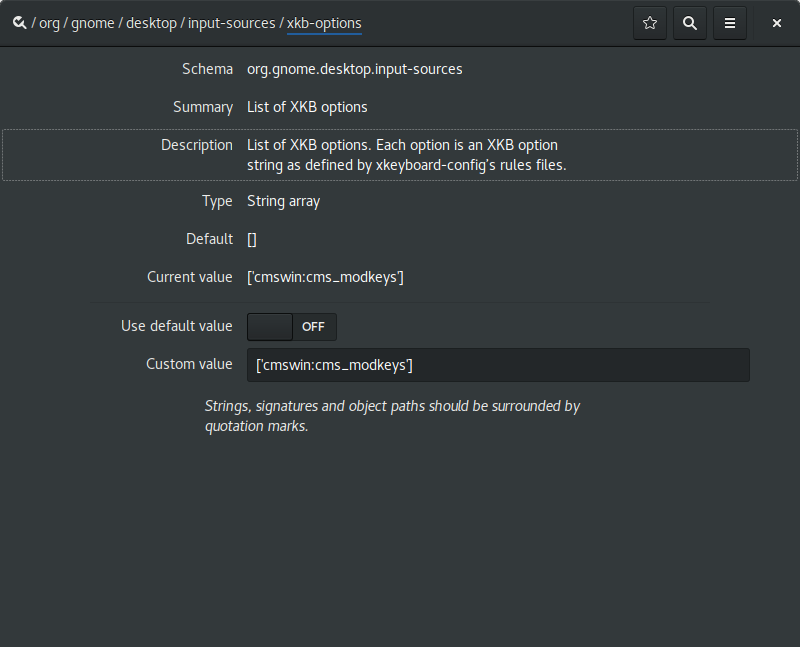
If you're playing along at home, you may have spotted that cmswin is not the name of any valid xkb layout. The wrinkle is that none of the built-in options offer quite the right set of combinations. So this is how I added my own custom XKB option.
I added a new file usr/share/X11/xkb/symbols/cmswin to define my partial keymap.
Its contents:
// alts are ctrls, winkeys are metas, ctrls are supers
partial modifier_keys
xkb_symbols "cms_modkeys" {
            replace key <LALT> { [ Control_L, Control_L ] };
            replace key <LWIN> { [ Alt_L, Meta_L ] };
            replace key <LCTL> { [ Super_L ] };
            replace key <RALT> { [ Control_R, Control_R ] };
            replace key <MENU> { [ Alt_R, Meta_R ] };
            replace key <RCTL> { [ Super_R ] }; };
}; // end
that defines the option.
Further to this, I modified /usr/share/X11/xkb/rules/evdev
adding the line
cmswin:cms_modkeys = +cmswin(cms_modkeys)
to the section
! option = symbols
I believe this is adding an option named cmswin:cms_modkeys to the dataset assigning it to parsing the 'cms_modkeys' entry from the 'cmswin' file, in the symbols subdirectory. The convention in xkb is to name all the different symbols using the same substrings, and it's terribly confusing when you're trying to remember which part does what, although slightly helpful when you're trying to perform the reverse map and locate which file is responsible for which option, I suppose.
The final step is to add the line
cmswin:cms_modkeys fix keys for emacs
into the file /usr/share/X11/xkb/rules/evdev.lst
I think this does something like import the option into the environment. There is also an evdev.xml file in the rules directory, which looks like it marks up the options to be used by the GNOME gui, but I didn't bother with that one, because life is too short to hand write XML for computers to parse, and I'd already spent half a day setting this all up. To give you an idea of how tedious this all was, for a while I'd added the evdev option into the section marked !option = types rather than symbols, and this caused wayland to stick to a crash loop as soon as I loaded the XKB option into the dconf key (with no visible error logs! yum!)
With all of this in place however, everything works fine. For now. GNOME seems to be in a bit of a transitory phase with regards to keyboard and input configuration, it looks like they're reworking everything to use IBUS in the long term, so I expect I'll be doing some form of this dance again within a year. Until then though, this document can serve as a reference for the next time I, or anyone else interested enough needs to figure out how to do this.
2017 then, and nothing seems to have really changed that much at all. Desktop Linux is still terrible, and desktop linux is still awesome. Emacs is still terrible, and Emacs is still the best tool I have.
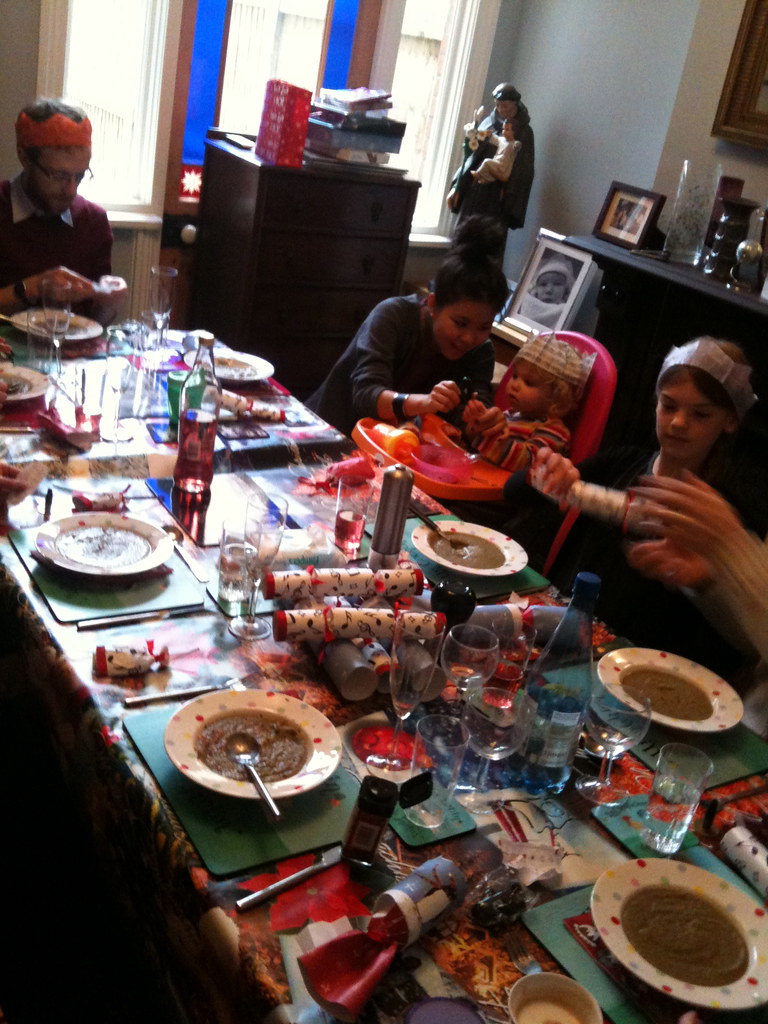
This year scheduling means our turn for hosting the big family meal falls on Christmas eve. Mrs S. did the lion's share of the cooking, facilitated by a new kitchen, more commodious than the postage stamp sized galley we've had for the past couple of years. Champagne, ice-cream,CBeebies pantomime on a loop, nut-roast, sprout and chestnut soup, mechanical penguins, musical crackers, roasted vegetables, and plenty of early presents for young Ada May to open and get over-excited about. Merry Christmas to all four of my readers!
The cognitive benefits of chewing gum : Study shows chewing gum effectively boosts mental performance.
I've been very gradually upgrading this site back to life for a few years now. Very gradually #amirite . However, after earlier this year having found myself accidentally on the front page of Reddit, HN etc. with my post about building the IMDb boards , I found myself slightly embarrassed, not only by the amount of attention ( 40k+ uniques in the first two days, holy shit! ), but also by people pointing out how clunky the site is to read. Often several times a day.
The styling on the blog section, much like the rest of the blog section, wasn't in a terribly well developed state of completion. I just threw together some hand-written CSS to approximate the look and colours of my last existing Wordpress theme, which I had been fairly happy with. Now that theme was set up maybe ten years ago, and my initial port over to this 'new', self-build CMS maybe four or five years old itself, and I had given no thought at all to mobile, or in fact any screen device very much different from my own laptop display. And my main laptop display is a 1024x768 pixel non- IPS Lenovo ThinkPad x220. That is probably a significantly worse screen than your phone has.
In 2017 it's pretty stupid to build web pages just to be viewed by desktop browsers, so today I'm pushing out a rebuild of the display layer and theme, that hopefully works a little more responsively across varied devices. It should also be easier for me to evolve. I hope it improves things for my handful of select readers. I'm not terrifically good at front-ending, and my heart isn't often in it, but I have tried my best.
I'd like to be updating this site more frequently again, he writes, like one of those bloggers apologising for never blogging , but a large part of getting any kind of schedule working there, is streamlining the publishing workflow. To that end, as well as a more modernised front-end and theme, today I've also released a new site deployment system, that allows me to update the site software more easily. This is clunky, but at least automated. Previously everything was just checked out into a home directory, hand compiled and run on the server. Now that's mostly still happening , but now it's all scripted with configuration management tools so I can release updates like this without having to remember exactly how to set it all up again by hand from first principles.
Of course, for writing articles, I'm still shelling into the server and hand writing html files like a farmer , but it's all steps in the right direction. Sometimes I don't shell in to the server, I author the posts directly using emacs tramp-mode which practically counts as using a GUI round here.
Ken Russell RIP : One of the 'name' directors that made me realise I was pretty interested in film.

Of course, I bought and read the Jobsography , Kindle edition, naturally. While I'm not sure I identify with all the howling fanboys' anguished reviews, given my role as super-NEXTSTEP-fanboy I was a bit disappointed, although not particularly surprised, at the relative lack of NeXT content. So I was overjoyed when this 1986 PBS documentary , featuring NeXT in it's pre-launch startup guise, popped up in it's wake. The linked blog post also contains the NeXT stevenote, from the eventual product launch.

Of course it's not actually running NEXTSTEP. Of course, in a sense it is. Just like your phone.
Thanks to ebay. I like the fact that the sticker arrived with a little template indicating the correct 28° of jaunt. I ignored it of course, and just lined it up by eye.
Things that Turbo Pascal 3 is smaller than : The Turbo Pascal 3.02 IDE and compiler, for MS-DOS, was an executable slightly less than 40KB in size. Here's a list of computery things that are larger than that.
As if finding young me in a box wasn't enough of a memo from Father Time, I've had the "circle of life" message underlined firmly this weekend, by throwing my back out. I mean, properly out, like a sit-com old man, or a Dad from the pages of the Beano. Lifting hurts, walking hurts, sitting mostly hurts, breathing hurts, and bending over is right out. It's one of those marvellous hysterical systems, as the slightest twinge of pain induces all sorts of involuntary tensing in the frantically overcompensating muscle superstructure of my back. The lower nervous system is clear in it's mission. No harm must befall the spine. I strongly suspect that the resultant freezing and spasm makes everything significantly more painful than the original twinge would have managed on it's own, but I am not a doctor. Even though I often assure people that I am, this is actually a well-practiced lie, serving the purposes of antique stock-comedy forms.
The generational aspect of this calamity draws from the fact that I triggered the strain whilst throwing young Ada May ceilingward, in response to her requests to "play flying". Unluckily for me, the initial spasm occurred at the point of release of a throw, meaning that despite my attention being drawn to all sorts of immediate and novel spinal trauma, I still had an falling two year old to catch safely before I could collapse sobbing to the floor with my honour and dignity intact. Two year old children, I must say, are quite a bit heavier than their one year old incarnation.
The thing with back trouble, most sources assure me, is to try and persevere through it. Grit one's teeth, and carry on as much of your normal routine as you can manage. On no account admit defeat and flee to your bed rest. Rest will relax and weaken your back, and exacerbate the problem, or if you're unlucky, invent some new ones. And so I struggle forwards in embittered mimicry of my daily routine, gasping and wheezing and moaning every couple of steps, frozen in place with involuntary grimacing stuck to my face. It has taken me nearly twice as long to get to work as it ordinarily might. Negotiating St. Pancras, I find myself flooded with sympathy for anybody with genuine mobility problems. The place is a nightmare, and it's supposed to be one of London's newest, most accessible hubs. I inch my way towards the office. All my hope is invested in my fancy orthopaedic stool . Please, mighty German engineering, please do your work.
Twenty-five year old me pouts condescendingly from my home page as I update my blog. He's got nothing but contempt for broken backed old men. He's too vain and pre-occupied to worry himself with mundane things like exercise and posture. I'm starting to hate that guy a bit.