As usual, beatworm.co.uk is the last site with the news.
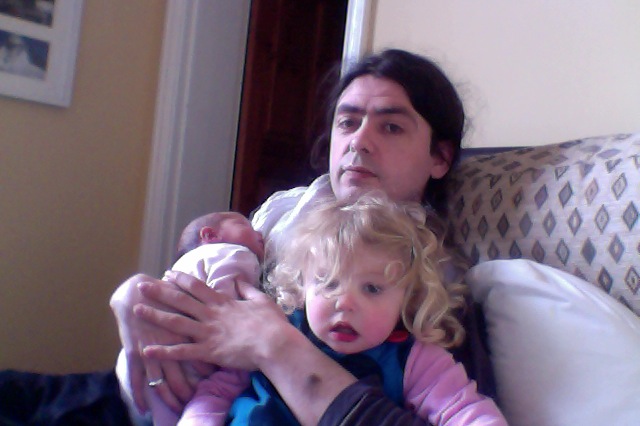
The baby finally came. We have a daughter. She's called Ada. I love middle initials, I enjoy my 'M' so much that I thought she might like one too, so she's Ada May. Her birthday is the 23rd of October. She came one day early.
Lots of people have spotted the connection to the proto-programmer and feminist icon , or the programming language that took her name. Truth be told, these are excellent associations, but supplementary; the original inspiration came from a pop song I was very taken with. It's got Sufjan Stevens on piano, you know.
These photos are all taken at the "Woah dude, I've got a baby!" and "troops of admiring relatives" ' phases, and are a few weeks old. We're currently at the "Oh bugger, she actually isn't going to sleep for more than 30 minutes in 24 hours" phase, and photo-ops have been pushed far from mind.
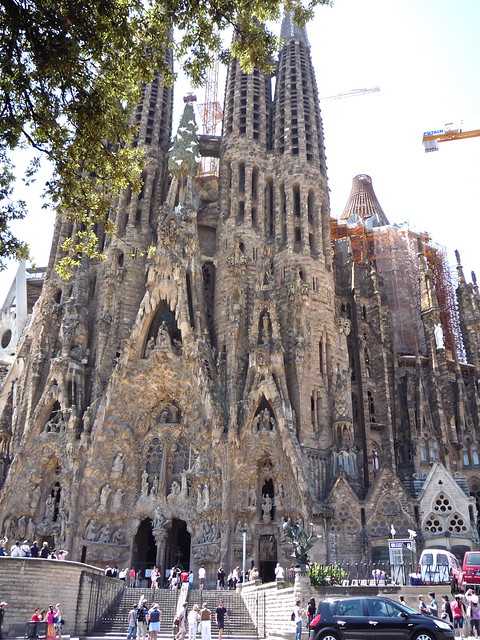
Back at the start of the summer, I went back to Barcelona, for a second visit to the very wonderful Primavera Sound festival. I travelled with the rather pregnant Mrs S., and (Uncle) Danny came along for the latter half of the stay, and also joined us for the festival.
Barcelona is still a marvellous city, and Primavera is still my favourite rock festival. While we were out there, Barcelona FC won the champions league . I can't pretend that I have any sympathy, interest, or even understanding of football, but I really enjoyed the electric city-wide atmosphere on the day; silent, tense and concentrating, as countless viewers watched the televised match, suddenly punctuated by sighs and unison cheers as chances were missed, and goals won; culminating in the riot of celebration erupting from every door and window onto the streets when the final victory was realised.
The festival was another success. The personal highlight, for me was the chance to finally see Lightning Bolt , unusually for them, an on-stage performance, that was one of the most exhilarating live shows I have ever seen. Shellac , playing again on the same ATP stage as last year, as good value as always, another chance to see Oneida , and sample some of the "heritage" acts, giving it some legend, like Sonic Youth , Throwing Muses , and Neil Young . A suprisingly energetic Michael Nyman band set in the indoor auditori was an unexpected highlight, as were a couple of new-to-me performances from Andrew Bird , and Gang Gang Dance . I was amused by Sunn O))) , but sadly unable to persuade either of my companions to stay and watch more than ten minutes of their set.
More disappointing were Marnie Stern , who I'd been looking forward to seeing again, seemed to be suffering from terrible sound and equipment problems, Deerhunter transforming a great album into a weak coldplay-lite live experience, an uninspired and frankly routine Art Brut performance, and a generically dull Jarvis set.
It turns out that I edited and uploaded my photos to flickr shortly after returning to the UK, but what with all the busying and rushing around re-organising and home renovating, I seem to have forgotten to switch the set to public, at least until now.
Dodgem Logic : Alan Moore is preparing to launch a new "underground magazine", with a mixture of content, including comics, and an intriguing sounding eight-page swappable insert for "local content"
We have recently had a wood-burning stove installed. With a baby on the way, I understand it's traditional to frantically embark on home improvement. Our house is old and draughty, as homes built around open fireplaces, one in every room, must be. The current central heating isn't very optimised for heat delivery, especially since we removed a good portion of the internal doors, and have yet to get around to replacing them.
The chimney breast, in what has become the main living room needed some attention, having suffered some water damage long ago, due to leaking. The leaks are gone, but the brickwork and surface plaster were left saturated and continued to deteriorate. Rounding it all off, it was mounted with a bulky, mantelpiece of slate, with ugly pseudo-wood veneer, and filled with garish orange ceramic tiles.
Installing the stove was a way of addressing these issues simultaneously. When fired up, it should produce a generous heat in the centre of the house, well suited to the original building design and airflow. As part of the installation, we've had the chimney lined, the fireplace and hearth reconstructed, and the chimney breast re-surfaced. We ordered the stove from Kindle in Bristol , and they also managed all the installation work, which only took a couple of days.
The stove is a ClearView Pioneer 400 . A clean-burn design, and the installation is certified for use in smokeless zones, such as Bristol. It's a multi-fuel configuration, which can be used to burn (smokeless) coal as well as firewood. We've built a small log store in the back yard, and filled it with a metre-cubed of sawn firewood.
Due to the unseasonably hot weather, I've not had too much of a chance to get it up and running, aside from a few test sessions. I'm not yet sure what our practical fuel consumption will resolve to. In my tests, I've so far determined that it is capable of generating a startling amount of heat after just a few hours of operation.
On a less practical note, it is simply enormous fun having a large burning fire you can fiddle about with, sitting within easy reach. It's very easy to get hypnotised by the thing, when it's burning. I find it considerably more interesting to watch than most things that are on the television.
Beehaus : Urban dwellers are being encouraged to keep bees by Natural England , with the launch of the Beehaus, an new user-friendly urban beehouse design from the firm Omlet .
2026 is the year of Linux (in Linux (in Windows)) on the desktop
I'm not a very Windows-focused computer user. In fact I think the last era I used it really extensively, with any expertise, was in the 16-bit era of Windows 3.1 - 3.11. I quite liked those versions, which operated somewhat more like an integrated interface SDK for MS-DOS than an independent operating system. As the commercial internet boom took hold, and work became focused almost entirely on building web applications targetting UNIX-like deployment environments, (typically linux), I shifted over to working natively in that environment, and never looked back. So, I don't really know how to use modern Windows at all comfortably, and I don't have any personal ease when working with it's native interface.
How I typically organise my development environments
Normal development tooling for me is a simple GUI windowing environment, running on Debian linux. I (still) use GNU emacs or increasingly zed for almost everything that isn't in a web browser, alongside a handful of running terminals, an email client, and some kind of file browser, and music player and that's about it. My development projects I tend to isolate into containers, using lxc/lxd and more lately, incus, to give me "lightweight" virtual hosts nested on my computer, connected with a virtual ethernet LAN. It effectively is a local 'cloud', offering dependency and process isolation for your work, and powerful features like snapshot/checkpointing, image templating. What I particularly like about the incus approach, compared say to other container systems, like docker, is the abstraction is well suited to longer-lived, stateful development systems - you partition one linux system into a few dozen smaller more specialised linux systems with the state hidden from each other. The unit of containment is 'operating system'. Whereas with docker-like containment, I think the unit of abstraction is something more like 'one process, with all of it's dependencies bundled', which makes more sense to me for one-shot tasks, or often as a deployment target.
Previously
Back in the 90s(!), when computers were a lot less powerful than they are today, I commonly used to use emacs 'tramp' or Ange-FTP modes, to develop remotely on a development or staging server, from a thinner client. Now I use the same approach, and the same tools, to develop on my container environments, effectively treating them like a 'remote' host, even though they're only conceptually remote. Tramp, just like most of emacs, is a kludgey wonder - it encodes the information about remote endpoints using pseudo-paths, like /ssh:user@host:/path/to/something , and emacs just works out how to edit your files. Under the hood, it strings together a glue of subprocesses and temporary file copies and the like, to take your editing and reflect it on the remote environment. And not just files. This is emacs! Almost everything in emacs works tramp-aware, so you can browse the remote filesystem using dired - launch processes for compilation or linting, use git workspaces with magit-mode, run interactive shells and debuggers, build and run your projects, it has extremely high levels of DWIM. The main price you pay is occasional latency, as things shuttle back and forth, or buffer in and out of pipes, but I’m very used to this. And compared with the days when I used to use tramp to work over dialup(!) links to servers, this modern container approach is practically turbo-charged. Eat my dust!
Zed simililarly offers remote editing using ssh connections, with a slightly different architecture. The zed remote feature is a little more modern, like VSCode - it downloads a headless install of the editor on the remote after you ssh to it, and then proxies to that backend using it's own protocols over ssh. The net effect is the same though, you work on your local keyboard screen and mouse, but your working environment is in the remote hosts. An advantage zed offers over tramp's elegant hackaround is that the latency is considerably reduced, it's not copying files backward and forwards and slowly lauching tasks in shells. A disadvantage zed offers, is that it's not emacs and it's tooling for lots of things (like git, or file browsing) are not as advanced or comprehensively scriptable. It's not uncommon for me to have both zed and emacs buffers attached to the same remote development context.
So, that's what development tends to look like to me. One or two graphical editors, on my main desktop. Many persistant projects mapped to running containers (and maybe remote hosts), with various different projects open in them for work. I get a persisting, consistent user interface over diverse projects, all of them in a full linux environment, each completely isolated from the others, but networked.
Windows re-enters the conversation
In my current job, we're using Windows, and the whole Microsoft business stack, and we have a IT managed network. It's a bit of a change from what I'm used to. But, unlike a lot of software developers, I've found that I like change! (Often, you learn stuff. So what have I learned?)
I've been issued with a pretty nice Microsoft Surface branded laptop. The hardware, at least, is nice (and higher spec than any of my own current computers). The software is, of course, Windows, which I remain suspicious of using. The surface runs it like a champ, of course.
Interestingly enough, modern Windows understands that the majority of software deployment is now to linux, or linux-like environments, and the developer tools include an integrated linux-based toolchain. It's called 'Windows subsystem for Linux' and it's on it's second major version - WSL-2. WSL-2 basically integrates a virtualized linux kernel running inside the windows enviroment, which can be used much as I've described my container approach above - you have a virtual linux host, with it's own filesystem and processes, and a convenient interface between this and the host system.
You can run your graphical applications, and even your IDE (Visual Studio Code, presumably :-)) , and browser (Edge, your AI-powered browser!) in your graphical desktop, and have a local 'server' for developoment. WSL integrates with Docker Desktop for Windows, allowing your docker containers to run natively in the linux environment, and you can even install and run multiple instances of WSL containers to have different isolated linux 'back-ends'. It's a compelling work narrative, but it is founded on the idea that your goal state is using Windows for all your user-facing software and interface. Howerver -- What if you don't want to?
It's a UNIX system, I know this!
Because the WSL environment is an optimised full linux VM, it seemed to me that I might even be able to treat the WSL environment like a remote linux system, and move my existing workflow over - use a linux desktop to remotely access a local linux "server", that just happens to be Windows, and run development inside there using my typical approach of multiple contexts isolated into separate system containers. That's more like my idea of best of both worlds - my work computer can be a locked down managed enterprise client, I can get good use from the fancy hardware, but still maintain the toolchains and client interfaces I'm most comfortable using. Assuming, of course, that I could get it all to work...
Well, it took a bit of fiddling, but I'm here to say it works, well! my Windows Laptop runs on my desk, my software projects run on it inside incus containers, and I access them from emacs or zed or terminal windows, on my ancient creaking linux desktop system. I can easily run as many of these containers as I can fit into my 24GB of WSL (actually quite a lot of headless containers, in my experience) - voila! My Windows laptop is now a cloud host provider!
Here's a detailed walkthrough of how I set it all up. Please note that you will need a local Windows admin account to make some of the necessary configuration changes to the Windows side of things, but aside from a couple of privileged config changes, all of this can be then run as a non-administrator user account, which is another great benefit.
(Because I set this up originally a year ago, my instructions are written from before Debian 13 was promoted to stable, which is why you'll see me using 'Bookworm' in a few places.)
The setup
First: Setup WSL
Firstly, you need to install a WSL2 environment. I picked Debian (which is supported), and I initialised this. I then system upgraded the Debian installation from bookworm (12/old-stable) to trixie (13/testing) using apt, because incus is packaged as part of trixie. I was then able to install incus using apt, and follow the incus initialisation and setup instructions from the project configuration page. I quickly launched a couple of bare bones containers to check that things were working as expected.
Inside your WSL shell, assuming your user account is in the incus and incus-admin groups (check this with the id command), you should just be able to run incus launch images:debian/12 - this should download a base debian image, and launch it with a generated container name.
You can see it running with incus list , and launch a shell within it with incus shell <container-name> - Please read the lovely docs for more such hints, this post is not intended to be an incus user guide ;-)
The next thing I did was add some additional WSL configuration by creating a .wslconfig file in my User home directory on Windows - this is a plain text ini file. I was pleased to find that Notepad.exe still exists in 2024, and can be used to create this file :-)
this is relatively self-explanatory - I'm giving most of my 32GB of RAM to the linux VM (because i'm not really using the windows side), I'm enabling nestedVirtualization, although I don't think this is a prequisite for running incus containers, it sounds like something I'll probably use at some point. Finally, and most importantly for this case, I'm setting the networkingMode up to use 'mirrored' networking mode - this replicates the windows networking devices and configuration inside the linux VM, meaning we can connect directly to the linux system from the network, without having to set up port forwarding or anything like this.
Once you've created the file you need to restart WSL in order for it to take effect. The easiest way to check if it's working is to look at your available system RAM in linux using free - it have changed to be 24GB. The next stage is to setup windows to allow client connections from the LAN.
Windows Networking
We also want to be able to connect to our virtual linux box conveniently from the LAN. This requires a few things. Firstly, we need a stable network address or name. Secondly, we need to allow incoming network connections. This part requires enough Admin privileges on the Windows host to change networking settings.
I redefined the network adapter settings in Windows to use a static IP for this LAN, and added a DNS name for it in my local resolver. I set this network configuration up as a 'Private' network profile. The next step is then to configure the Hyper-V firewall on windows to allow incoming connections to pass to the VM. Running a powershell window as admin, I added firewall rules to allow this for the private network profile. In this way, I can ensure that the host is only accesible like this on trusted networks.
The WSL vm has a fixed identity string (the VMCreatorId) , a GUID, which is 40E0AC32-46A5-438A-A0B2-2B479E8F2E90, so the command you need is something like
Now incoming connections on the windows IP interface will be receivable in the WSL VM. Enable sshd on the WSL environment, and then check that you can ssh to the network address. You should get a login inside the WSL environment. If you run incus list here, you should see any running incus instances.
Bonus networking: Setup ssh proxying, and multiplexing
You can now access incus containers on the WSL instance from a remote emacs, if you use the incus-tramp method, and tramp pipelining. Access a path like /ssh:[email protected]|incus:me@container-name:/path/to/project in emacs and everything should be there. Relying on additional tramp stages for proxy chaining, although it's a very neat trick, can bring problems with performance, and reliability, and it is more simple to push the extra hops into the ssh layer.
This involves a bit of glue code, which looks hideous, but works very well.
The ssh glue
Setup 'Control Master' for ssh, which allows repeated ssh connections to the same host to re-use an established ssh session. This will speed up the time taken to open new sessions, and noticeably improve the responsiveness of tramp for ssh remotes. Secondarily, use a ProxyCommand directive to connect a single ssh connection to a proxy session. Finally, you can use wildcard rules with a host suffix matching a certain host pattern straight through into an incus container on a specific host. Here's the relevant entries from my ~/.ssh/config
In ssh configuration files, the first applicable setting is the one that will be used, so we should order the file from most specific towards most general.
Here, we're using a fake 'domain' of .wsl, and then converting the command to an ssh to the windows host, that immediately launches incus, getting the container name by chopping off the '.wsl' from the provided hostname and running 'netcat' in the container to proxy our ssh session to the ssh server inside the container. With this little piece of ugly glue, we can run ssh container-name.wsl and immediately get an ssh session directly into the running container called container-name
The control master block ensures that we re-use an established ssh control session for all connections to the same host, and persist it for 10minutes after the last connection exits, to improve reconnection times.
With this piece in place, we can access files, shells, and processes from emacs buffers, using a tramp path of /ssh:my-container.wsl:/path/to/project - or laucnch a zed session in a remote project directory, using their ssh 'remote project' feature.
Surviving restarts
The main, and perhaps the only real downside of this approach is that Windows likes to restart, often. Usually in batches once or twice a week. This is a combination of updates from remote IT and Microsoft I suppose. Rather than get too aggravated about it, I prefer to think of it as a free chaos monkey.
I can alleviate most of the pain points by making everything as restart-able as possible. WSL can be set to start as soon as you login by tweaking a few settings in the cmd.exe application
set the default shell to be Debian to match my WSL container session
set cmd to start on login
This means that after a boot all I have to do is login to resume the WSL state
The incus container can be set to automatically start at boot with incus config
I have assigned both the incus container and the windows machine static IPs on my LAN, so they reboot with a stable address.
In WSL I have caddy set to reverse proxy from Debian to the incus address, and this is configured in /etc/caddy and run from a systemd unit, to restart on boot
The local "staging" version of any webservices I am working with I typically run in Docker , inside the inucs container (as my user account) - i usually write a shell script to launch docker with the right port forwarding and data persistence flags for whatever I want to be running (for more complex setups this could be a docker compose configuration) - I simply put this shell script into my user crontab, using the magic @reboot trigger directive to launch this script after multi-user init, as me, with just a one-liner.
with these configurations in place, all I need do is login to Windows (with my face 😘) to resume running services where I left them.
Electric suicide ants : Colonies of lasius neglectus , the poison-resistant "Asian super ant", whose magnetic compulsion for electricity sources is so strong they can represent a fire hazard, have been identified in the UK for the first time.
3. On a nearby OS X Leopard notebook, setup a new bluetooth serial port, type RS232. ( System preferences -> Bluetooth -> Advanced ). Call it something like 'Bluetooth-console'. Ensure the Mac is paired with the phone.
4. In a terminal, run ' screen /dev/tty.Bluetooth-console '
5. Set your Mac's bluetooth to 'discoverable'
6. Launch the Python application you've just installed on your phone. Select Options -> Bluetooth Console -> Other. Choose your Mac, and then select the Bluetooth-console serial port as the device.
7. Meanwhile, back on the Mac: a python shell will start in your screen session after a small delay.
8. In the python session, " import audio "
9. In the python session, " audio.say('I never realised my phone had a built-in speech synthesizer') "
For the past year and a bit, I've been relying on a one-user GoTosocial server for my fediverse participation. Fediverse is the 'well, actually' technically correct name for the social network protocols that power an overlapping set of free, distributed social networks that a lot of people just call 'Mastodon'. Mastodon is the largest and most popular server software used in this network, and got a significant bump in popularity when that crazy space junkie guy started hacking on twitter.
Monoliths vs Microliths
Mastodon is a large Ruby on Rails project, with the typical kind of architecture you might expect from a classic LAMP-adjacent dynamic web thing that's used in production to run instances with thousands and thousands of active posting user accounts, and a hefty server footprint.
Gotosocial is a fediverse server that specifically targets a lower footprint installation. It's written in Go, which while not being the kewlest platform to build a modern web server application in, is to my eyes, a pleasingly pragmatic choice. (Something I often like to say is 'Go is actually kind of a DSL for building small network servers in'). It also targets full mastodon compatibility, so it's a drop in replacement for a mastondon account, and much simpler to run if you were interested in having your own fediverse service.
WASM-azing!
Whilst Gotosocial has a modest footprint, and a few moving parts, it's not without some interesting technical architectural decisions. In one of its simpler installable forms, rather than use an external relational database like PostgreSQL, it just uses good old SQLite3 😍 - and rather than pay the CGO / boundary penalties for linking directly into SQLite as a shared library, it can actually run SQLite as a contained WASM process inside the go application, using the Wazero runtime
I adore everything about this approach, it's exactly the kind of mad science I'd try to get a simpler working service. End result is you have a single static binary that you can run and install, and it manages its own fully compatible SQlite3 database store in-process, without any install-or-link-time dependencies.
So it's super simple to install for me on linux, I simply need to unpack a binary linux release tarball and then launch the newer binary with the old database file. Gotosocial applies database migrations on startup.
Official upgrade procedure
Here's their offical upgrade instructions taken from codeberg for the binary release
Stop GoToSocial
Back up your database! If you're running on SQLite, this is as simple as copying your sqlite.db file, eg., cp sqlite.db sqlite.db.backup
Download and untar the new release, including the web assets and templates, not just the binary
Edit your config.yaml file as necessary (see the release notes)
Start GoToSocial
Wait for migrations to run.
It's about as simple as a manual upgrade can be.
My Tweaked upgrade procedure.
Well, aside from scripting it, I think there's one small improvement that can be made. So far as I know, GoToSocial doesn't (yet?) run auto vacuum on its SQlite database. VACUUM on SQLite is a necessary maintenance procedure that's used to refresh, compact and optimize the database backing store after it's been amended in use for some time. You can think of it a bit like a 'defrag' or a 'garbage collecter' for your database.
Without auto-vacuum, vacuum is necessarily a blocking operation, you will block all other database changes until the vacuum is done. As such it's ideal for downtime. So vacuuming your GoToSocial database when you upgrade is a good idea, although it does extend your service downtime by a couple of minutes.
So, as well as copy your database to a backup, I suggest you also connect to it, with the sqlite3 command and run a complete VACUUM. But wait, we can be even cleverer.
VACUUM INTO
Vacuum already makes a complete copy of the database. Go back and read the VACUUM documentation I linked above. You might also notice that SQLite VACUUM supports a 'VACUUM INTO' form, which materializes this vacuum copy information into a fresh database file.
so my amended system upgrade is like this, pretending for the sake of example that it's a manual process.
chdir to my gotosocial directory /gotosocial
download the new tarball release
stop gotosocial with systemctl stop gotosocial
rename the old gotosocial binary to a versioned backup
untar the new release and assets into the directory
renamegotosocial.sqlite to a versioned backup name e.g. gotosocial.backup.sqlite
connect to the newly renamed sqlite database with the sqlite3 ./gotosocial.backup.sqlite command
run VACUUM INTO 'gotosocial.sqlite' (i.e. re-creating an optimised gotosocial database)
start gotosocial again systemctl start gotosocial
watch the migrations and startup with journalctl -f -u gotosocial
I've not posted a gig write up in a long time. One day I might get around to post-documenting some of the backlog. However, here's something very fresh.
Last night I went to see Fever Ray . Fever Ray is the assumed band name of Karin Dreijer Andersson, one half of the strange and compelling Swedish brother-sister art-electronica duo, The Knife .
The ticket price for this one was fairly steep. Seventeen pounds is a lot to ask for an debut act, on a Bristol weekday evening. Knowing the Knife to have something of a penchant for staginess and performance statements , I figured that the cost of admission might indicate a more elaborate performance spectacle than the routine Academy show. It wasn't a terribly full crowd, which may have also had something to do with the ticket price. Luckily my expectations of an interesting presentation were met, more than satisfactorily.
A stage swathed in as much machine-made fog as I've seen since I last watched the Sisters Of Mercy, decades ago. For readers unfamiliar with the Sisters' stage ouevre, let me clarify; this means a lot of fog . The five-piece band only identifiable as bizarre silhouettes suggestive of a dark circus. Improbably tall hats, shadowy pierrot faces, frock coats, hunched shoulders. Karin, stage center shrouded in an enormous cowled cloak , the headress simultaneously suggesting fur and antlers and briar-hedge basketwork, her peculiar outline only really humanised by oversized white gloved hands. During the second song, she cleverly unfurled her cloak a little, a sudden backlight creating a surprising stained-glass panel effect that seemed to shine from inside her.
The whole performance was a meticulously staged progression, slowly opening up the initial murk. At the start the overhead fog was scissored dramatically by a pair of slow moving laser beams. By the second song, they'd each expanded to a pair of fan shapes. Later on these picked up oscillating movement, and eventually traced out colour shifts in the waves of fog. Within the on-stage gloom, the odd sight of a dozen or so standard-lamps, pulsing away in time to the beats through thick lampshades. I didn't have my camera with me, although I expect it would have struggled to capture any of this well. Quite a few people have submitted photos of previous shows to flickr .
As the show progressed, the stage was slowly up-lit from the back with soft blue and yellow glows. The cloak was shed, placed on a stand just behind front of stage, it still loomed, like some kind of shadowy spirit-familiar. Gradually we could see a little more of the performers, jigging around, wildly shaking shamanistic totem-sticks, pounding away on congas and toms, yet still the lighting and smoke effects kept them essentially obscured and anonymous.
The short set stuck solidly to the album, without encores, which was fine by me. My attention didn't wander, nor did I tire of standing in place. My only complaints would be with the slightly murky sound, which isn't that unusual for the Academy, and that the music didn't really connect as terribly live, aside from the vocals; pitch-shifted, yet weirdly still human and very real. I think this was probably down to a combination of the very programmed sounds, and the distancing effect of the theatrics. It was something more like watching a stage-show display set to a musical playback, than a rock music show. I took it as an opportunity to watch something a little out of the ordinary, and enjoyed myself.
The album is ace, and I recommend it to anyone. You can find it on spotify .
The video for "Triangle Walks" gives an impression quite close to the live show. There are some other videos available on the band site which give a good sense of the Fever Ray aesthetic.